Visualization
Plot your data throughout an analysis. A quick graph can reveal a surprising value, a time pattern, or a relationship that a table of numbers hides. Begin with a question and identify what one observation represents before choosing a plot.
Basic plots in R
Different plots answer different questions:
| Question | Useful starting point | What is shown? |
|---|---|---|
| How are values distributed across observations? | Histogram or boxplot | Variation within a numerical variable. |
| How do named categories or places compare? | Bar chart | One specified value per category or place. |
| How does a value change over time? | Line chart | Repeated measurements in their time order. |
| How are two numerical variables related? | Scatterplot | Paired values for the same observations. |
A bar chart of three states’ forest shares and a boxplot of forest shares across all states answer different questions. A boxplot summarizes a distribution and hides the identities of individual observations; bars retain their category labels. A histogram groups numerical values into intervals, rather than displaying one bar per named category.
Most graphs need only a few arguments to become understandable:
plot(pressure$temperature, pressure$pressure,
     xlab = "Temperature (degrees Celsius)",
     ylab = "Vapor pressure (mm Hg)", pch = 16)
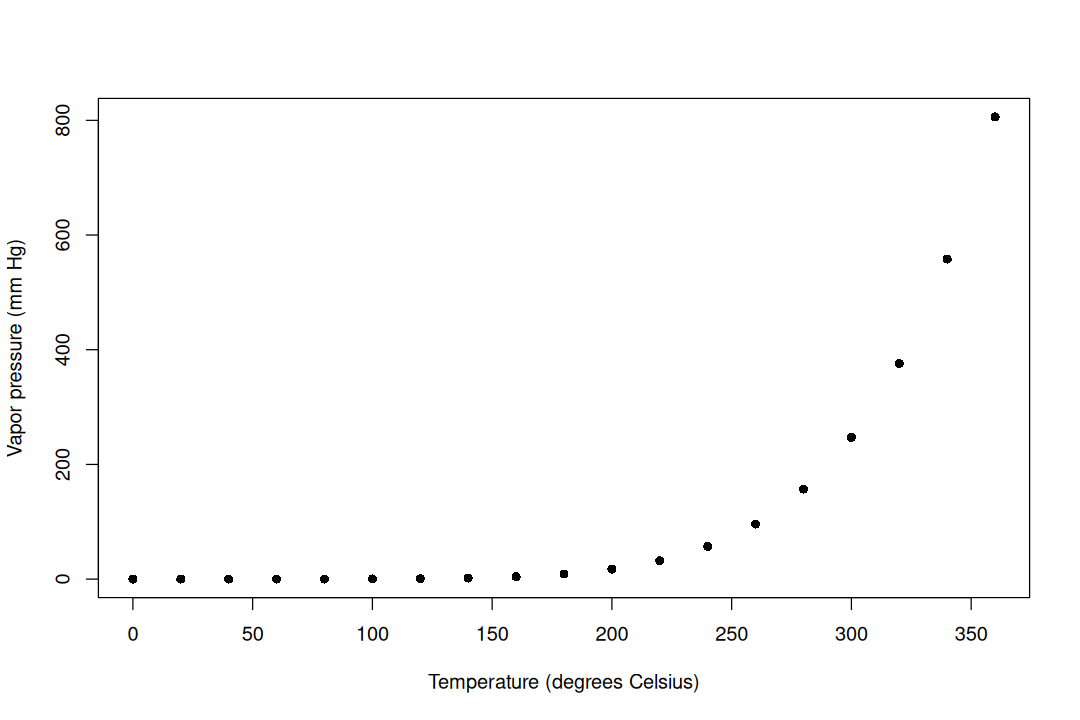
pressure is a built-in R dataset. xlab and ylab describe the variables and units; pch selects the point symbol. The R dataset documentation explains the observations. The land-use exploration example demonstrates category comparisons with barplot().
Example: Compare tree growth over time
R’s built-in Orange data record repeated measurements of the trunk circumference of five orange trees. We will compare trees 1 and 2. Time here is age in days (the source records days since December 31, 1968), and circumference is measured in millimeters. These are practice data, separate from the timber assignment.
Select each tree and sort its observations by age before connecting points. Connecting rows in an arbitrary file order can produce a misleading line:
tree1 <- Orange[Orange$Tree == "1", ]
tree2 <- Orange[Orange$Tree == "2", ]
tree1 <- tree1[order(tree1$age), ]
tree2 <- tree2[order(tree2$age), ]
Start the graph with plot(), then add another series with lines(). Set the vertical range using both series so that the second one is not clipped:
plot(tree1$age, tree1$circumference,
     type = "b", pch = 16, col = "steelblue",
     ylim = range(tree1$circumference, tree2$circumference),
     xlab = "Tree age (days)", ylab = "Trunk circumference (mm)")
lines(tree2$age, tree2$circumference,
      type = "b", pch = 17, lty = 2, col = "darkorange3")
legend("topleft", legend = c("Tree 1", "Tree 2"),
       col = c("steelblue", "darkorange3"),
       pch = c(16, 17), lty = c(1, 2), bty = "n")
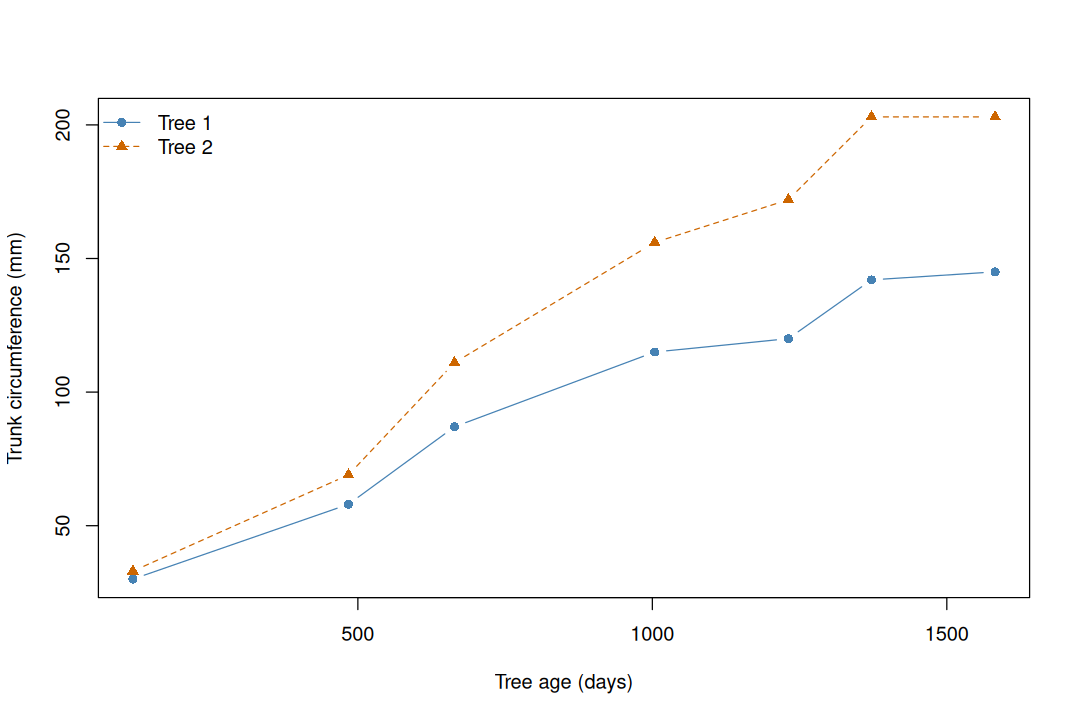
type = "b" draws points and connecting lines; type = "l" draws lines alone. lines() adds to an existing graph, and legend() identifies the series. Different point symbols and line types also help readers distinguish series without relying only on color. The lines connect observed measurements; they do not establish what happened between measurements or forecast future growth.
Compare the question with a scatterplot of one tree’s circumference against another’s: that would ask about a relationship between paired measurements. A time plot retains age as an explicit variable. A line joining two measurements should represent a meaningful order, not simply adjacent rows.
The Base R line-chart page gives further examples; the official Orange documentation describes these data.
Visualizations 101
For each quick graph, check:
- Question: Does this plot show a distribution, a category comparison, a time course, or a relationship?
- Observations: Are the points or bars states, years, trees, or something else? Are all observations at the same geographic level?
- Labels: Can someone identify both variables and their units without reading the code?
- Scales: Are all series visible? For bars, begin the value axis at zero so that bar lengths remain interpretable. For comparisons across panels, consider common limits.
- Groups: Does the legend explain symbols or lines? Do categories overlap or include a total that would double-count its parts?
- Interpretation: Describe the pattern the figure supports. A visible association alone does not establish a cause.
For plotting details, consult Base R: Creating graphs and Base R: Barplot. For further reading on figure design, see Kelleher & Wagner, 2011. The R Graph Gallery offers inspiration, although many examples use additional plotting packages.