
| LM | Edit |
🛠️ Working with CSV Data
In this section, you’ll learn how to read, explore, and manipulate data from a CSV file using pandas.
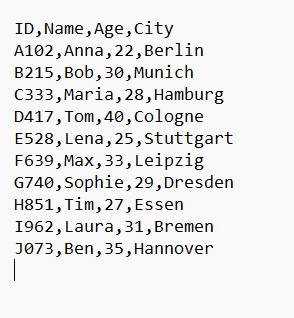
📥 Import CSV into a DataFrame
import pandas as pd

url = "https://geomoer.github.io/moer-base-python/assets/tests/unit07/csv_example.csv"

df = pd.read_csv(url)
Iterate over the rows
df.iterrows() is a method in pandas that allows you to iterate over the rows of a DataFrame one at a time.
for index, row in df.iterrows():
    # you can access row data like this:
    print(index, row['Name'])
📋 Get Column Names
print(df.columns)
Access Values from a Column
df["Name"].values
Returns a NumPy array with the raw data from the “Name” column — without index, formatting, or metadata. —
🔍 View Rows
df.head()      # First 5 rows
df.head(10)    # First 10 rows
df.tail(3)     # Last 3 rows
🔢 Access Specific Rows
Use .iloc[] to access rows by position:
df.iloc[0]     # First row
df.iloc[1:3]   # Rows 2 to 3 (index 1 and 2)
Search for a Value in a Row
# This line takes row 1 of the DataFrame and converts it into a regular Python list.
row_list = df.iloc[1].tolist()

if 'Bob' in row_list:
    print("Found Bob")
Update DataFrame values by using labels (row index and column names).
Key points Syntax: df.loc[row_index, column_label]
for index, row in df.iterrows():
  df.loc[3, "Name"] = "Updated Name"
  print(df.loc[3]["Name"])
🔁 Search using iterrows() — 3 different methods
Each of these does the same task but uses a different technique:
for index, row in df.iterrows():
    if "Maria" in row.to_string():
        print("Row " + str(index) + ": " + row["Name"])

for index, row in df.iterrows():
    if "Maria" in row.tolist():
        print("Row " + str(index) + ": " + row["Name"])

for index, row in df.iterrows():
    if "Maria" == row["Name"]:
        print("Row " + str(index) + ": " + row["Name"])
| Method | Works? | Best used for |
|---|---|---|
row.to_string() |
✔️ | Searching the entire row as text (imprecise and slow) |
row.tolist() |
✔️ | Comparing against all values in the row as a list |
row["Name"] |
✔️✔️ | Best method for checking a specific column |
⚙️ Search for a Value in a Row with.apply()
print(df[df["Name"] == "Maria"])
print(df[df.apply(lambda row: row["Name"] == "Maria", axis=1)])
print(df[df.apply(lambda row: "Maria" in row.values, axis=1)])
print(df[df.apply(lambda row: "Maria" in row.to_string(), axis=1)])

# df.apply(...): Applies a function to each row of the DataFrame.
# axis=1: Ensures the function is applied row-wise.
# Each line demonstrates a different way of searching for "Maria" in the rows.
        print("Row " + str(index) + ": " + row["Name"])
| Method | Speed | Why |
|---|---|---|
df[df["Name"] == "Maria"] |
⭐⭐⭐⭐⭐ (fastest) | Fully vectorized, uses optimized Pandas internals |
df.apply(lambda row: row["Name"] == "Maria", axis=1) |
⭐⭐ | Row-wise Python function (slow) |
df.apply(lambda row: "Maria" in row.values, axis=1) |
⭐ | Checks all row values (slower) |
df.apply(lambda row: "Maria" in row.to_string(), axis=1) |
🚫 Very slow | Converts entire row to string; avoid |
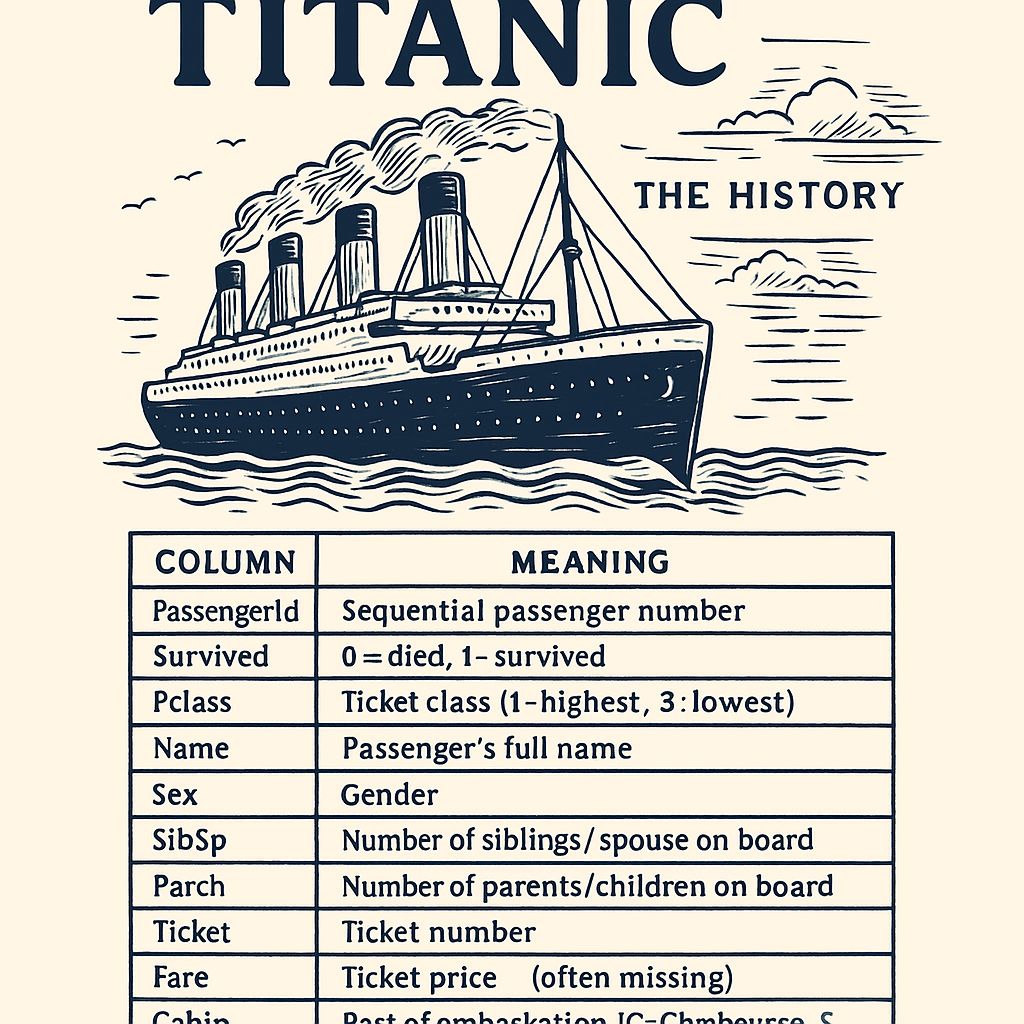
Titanic Test
import pandas as pd
import time

df = pd.read_csv("https://raw.githubusercontent.com/datasciencedojo/datasets/master/titanic.csv")

# 1) Fastest (vectorized)
start = time.perf_counter()
print(df[df["Sex"] == "female"])
end = time.perf_counter()
print("Elapsed time (vectorized):", end - start, "seconds")


# 2) Slower .apply exact match (should find nothing)
start = time.perf_counter()
print(df[df.apply(lambda row: row["Sex"] == "female", axis=1)])
end = time.perf_counter()
print("Elapsed time (apply exact match):", end - start, "seconds")


# 3) Apply on values (slower)
start = time.perf_counter()
print(df[df.apply(lambda row: "female" in row.values, axis=1)])
end = time.perf_counter()
print("Elapsed time (apply values):", end - start, "seconds")


# 4) Apply with row.to_string (slowest)
start = time.perf_counter()
print(df[df.apply(lambda row: "female" in row.to_string(), axis=1)])
end = time.perf_counter()
print("Elapsed time (apply to_string):", end - start, "seconds")