
Example: Colors
Before we expand our plotting capabilities, we want to spend a bit more time
thinking about colors and color spaces. A careful study of color-spaces
(e.g. Zeileis et al. 2009)
and
Wikipedia
could lead us to the conclusion that the hcl color space is preferable when mapping a variable to color (be it factorial or continuous).
This color space is readily available in R through the function hcl().
But before we dive into this, let’s create a function that draws color palettes:
library(colorspace) # needed for function desaturate()

### function to plot a color palette
pal <- function(col, border = "transparent", ...) {
 n <- length(col)
 plot(0, 0, type="n", xlim = c(0, 1), ylim = c(0, 1),
      axes = FALSE, xlab = "", ylab = "", ...)
 rect(0:(n-1)/n, 0, 1:n/n, 1, col = col, border = border)
}
Let’s start with a particularly bad example of a color palette, the rainbow color palette, sometimes also referred to as jet-colors (that’s MATLAB talk).
pal(rainbow(100))
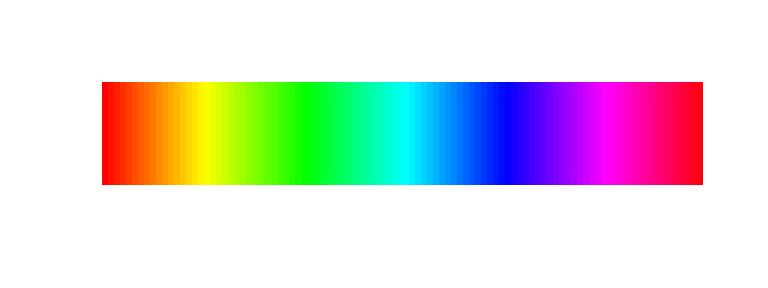
We see that any change that may be happening in the green region will not be noticeable whereas changes that happen from red, via orange to yellow will be very prominent even though the underlying data change (let’s assume a change of 5 units) will be identical. This leads to perceived edges in the visualization which do not reflect real changes in the data.
This becomes even more evident when we plot the colors in grayscale:
pal(desaturate(rainbow(100)))

Such a color scale does not linearly represent continuous data.
There have been numerous attempts to produce perceptually consistent, yet visually pleasing
color palettes. One very good example of this is colorbrewer2.org
These palettes can be accessed through the R package RColorBrewer.
library(RColorBrewer)
brewer_rainbow <- colorRampPalette(brewer.pal(11, "Spectral"))
pal(brewer_rainbow(100))

Most of the edges are gone and the result looks quite pleasing too. To check how effectively this palette takes care of the above observed edges, let’s again look at the grayscale version:
pal(desaturate(brewer_rainbow(100)))

Not bad at all, though there is a distinguishable increase in lightness towards the middle of the scale. This is accepted in this case as this color scale is a diverging color scale. This means it should only be used for visualizing deviations from a central value (e.g. zero). Do not use this color scale to represent sequential data (i.e. data changing only in one direction)!!
In order to create a truly perceptually uniform color scale we need to use the hcl color space. As mentioned above, this can be done using hcl(). Here, we create a function that produces a color palette of a length n specified by the user, based on the hcl color space:
clrs_hcl <- function(n) {
  hcl(h = seq(0, 260, length.out = n),
      c = 60, l = 50,
      fixup = TRUE)
  }

pal(clrs_hcl(100))

This looks a bit pale, yet there are no observable edges in the palette. Let’s check the grayscale version.
pal(desaturate(clrs_hcl(100)))

Nice! One evenly distributed grayscale without any changes in lightness along the palette. So this is truly a perceptually uniform color palette where only the hue changes.
One obvious problem with this color palette is that when printed in grayscale, all values will look exactly the same… To address this, we can modify our clrs_hcl definition slightly by also varying the lightness (or better luminance) along the same length n along which we change the hue.
clrs_hcl2 <- function(n) {
  hcl(h = seq(0, 260, length.out = n),
      c = 60, l = seq(10, 90, length.out = n),
      fixup = TRUE)
  }

pal(clrs_hcl2(100))

… and in grayscale…
pal(desaturate(clrs_hcl2(100)))

This color scale is visually pleasing and represents the data honestly. Low and high values are readily discernible even in grayscale.
Color is one part of an accessible figure. Identify lines with labels, symbols or line types as well as color, and describe the relevant pattern in the accompanying text. Check whether the distinction survives grayscale and whether the legend names the values or groups. A constant-lightness palette can distinguish hues while losing those distinctions in grayscale, as the examples above demonstrate.